![01 PR_Main Logo_Full Color_RGB.png]](https://guide.propello.com/hs-fs/hubfs/01%20PR_Main%20Logo_Full%20Color_RGB.png?height=40&name=01%20PR_Main%20Logo_Full%20Color_RGB.png)
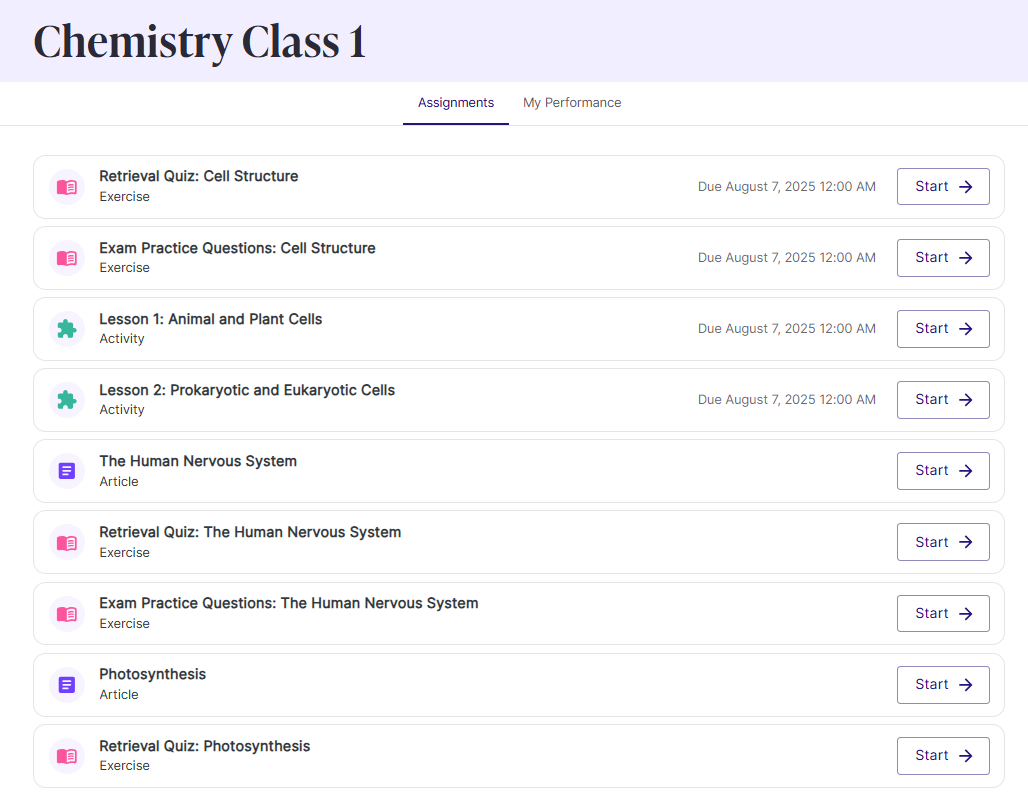
Inside each class, you’ll find the Assignments tab — this is where your teacher sets the tasks you need to complete.
Here’s how it works:
-
Check your list → You’ll see all your assignments with clear due dates.
-
Click Start → Begin the task and work through the questions or activities at your own pace.
-
Stay focused → Take your time, but don’t leave it too late!
-
Click Submit → Once you’re done, hand your work back to your teacher with one click.
⚡ Always submit before the due date so you stay on track — no last-minute stress, and your teacher has more time to give you helpful feedback.
💡 If you’re unsure about an assignment, open it early to check what’s required. You can always return later to complete it.