![01 PR_Main Logo_Full Color_RGB.png]](https://guide.propello.com/hs-fs/hubfs/01%20PR_Main%20Logo_Full%20Color_RGB.png?height=40&name=01%20PR_Main%20Logo_Full%20Color_RGB.png)
The Review tab gives you a powerful overview of student and class performance. Results are displayed in a clear, colour-coded grid so you can instantly identify strengths, learning gaps, and areas where intervention may be needed.
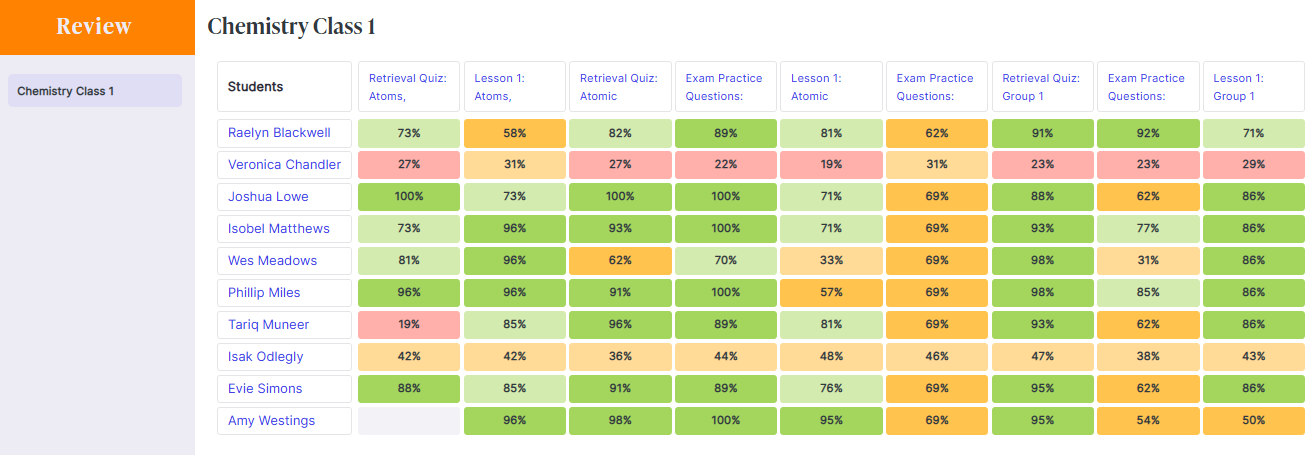
Performance grid
When you open the Review tab, you’ll see the performance grid:
-
Rows = Students → Each row represents one student in the class.
-
Columns = Assignments → Each column represents a different assignment you’ve set.
-
Cells = Scores (%) → Each cell shows the student’s percentage score:
-
Green = strong performance.
-
Yellow/Orange = average performance.
-
Red = weak performance.
-
-
Bottom Row = Class Average → A quick snapshot of overall group performance.
Clicking on a student’s name opens their individual performance history, allowing you to track progress across different assignments and subjects.

💡 Use the performance grid during department or progress meetings to highlight trends and identify students who may benefit from targeted support or extension activities.